
ENVIROMUX-MINI WAP Mobile Summary Page
Instructions to login to the summary page using a mobile phone
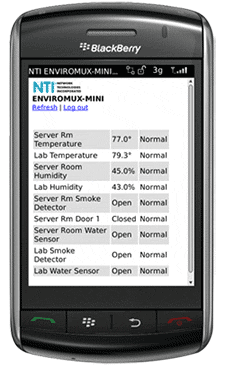
Viewing the ENVIROMUX-MINI summary page on a mobile phone:
- The mobile summary page lists all connected sensors' current values and alert statuses.
- Supports WAP 2.0 compatible devices (smartphones, PDAs, cell phones, etc.)
- Supports Blackberry Software 4.2 and higher.
Accesing the ENVIROMUX-MINI summary page on a mobile phone:
- Enter http://98.17.207.196/mobile into your cell phone / PDA web browser.
- The User ID to login to the web summary page is: Administrator
- The password to login to the web summary page is: admin